Reference
Filters panel — narrowing the map by climate, altitude, infrastructure
The filters panel is what you reach for about thirty seconds after the map first loads. It turns staring at a country into asking it a question.
Where to find it
Open the map for any supported country. The panel sits on the left side, collapsed into a narrow strip on mobile and expanded by default on desktops wider than about 1100 pixels. The label on the strip reads Filters; click or tap to expand.
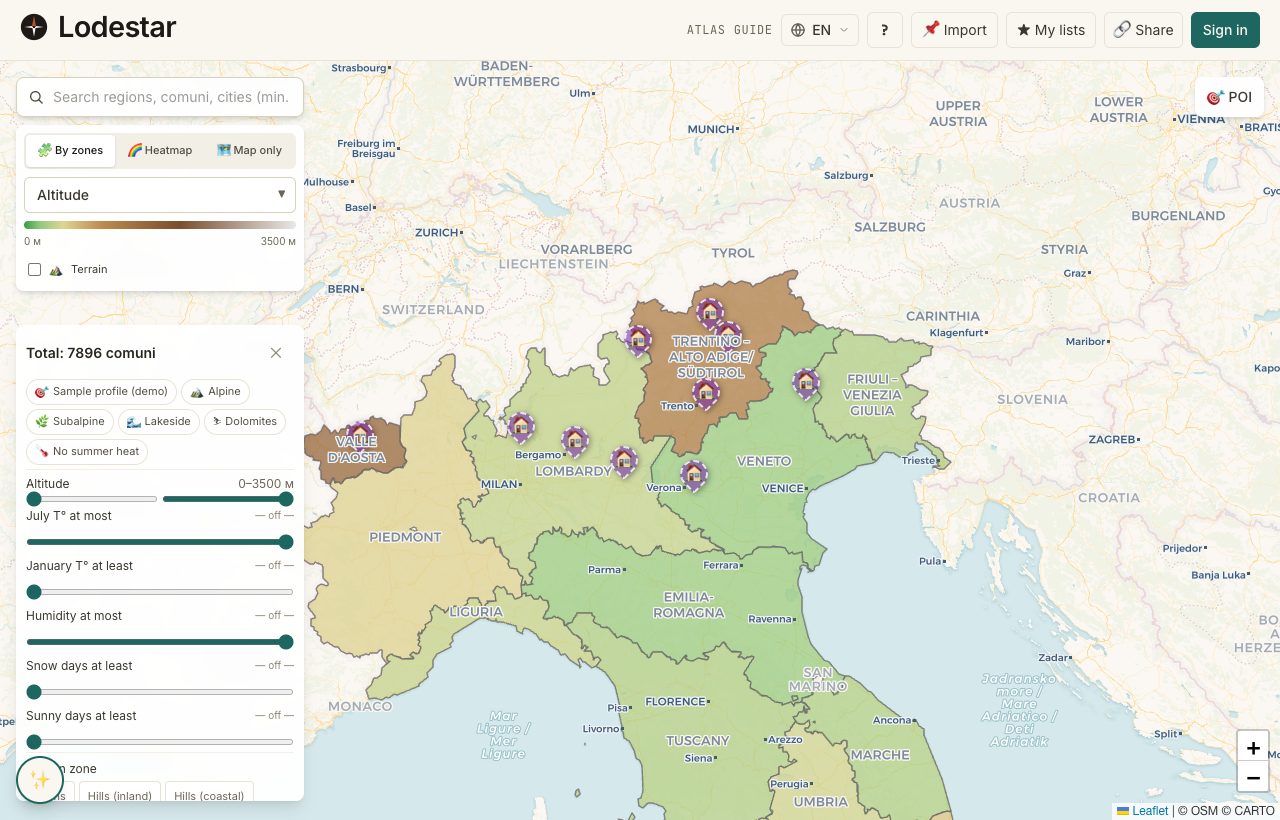
If you arrived through the relocation quiz, the panel may already have a few sliders set — those come from your quiz answers. You can override anything. The quiz is a starting point, not a contract.
How it works
The panel exposes 7 filters today. Each one is either a numeric range (slider with two thumbs) or a categorical toggle. Filters combine with AND — a location passes the panel only if it satisfies every active filter.
The filters, one by one
- Altitude — metres above sea level. Useful for ruling out coastal heat or finding mountain villages.
- Mean temperature — annual average in °C. Pair with the next two filters for a more precise climate cut.
- Humidity — average relative humidity. Coastal locations skew high; inland plateaus stay drier.
- Snow days — number of days per year with snowfall. Set to zero if you are running from winter.
- Sun days — days per year with at least four clear hours. Reverse of the snow filter for sun-seekers.
- Population — total residents. The lower end finds villages; the upper end ignores them.
- Hospital distance — kilometres to the nearest hospital with an emergency room.
Sliders are bound at runtime to the actual minimum and maximum in the data set. If you are looking at a country with only inland regions, the altitude slider will not start at zero — it starts at whatever the lowest value in the data is. The labels on the slider ends reflect this.
Resetting
Each filter group has a small × button next to its title — that clears the group. A bigger Reset all button at the bottom of the panel clears every filter at once. Keyboard users can also press Esc while focused inside the panel to reset the focused group.
How filtering affects other layers
When a filter is active, the choropleth layer dims locations that do not pass; pins and shortlist beacons stay visible regardless. This is deliberate — you should not lose the place you already saved just because you turned on a sun-days filter and it accidentally excluded it.
What to keep in mind
Filters work on whatever data has been ingested for the country in question. Coverage varies. Italy, for example, is currently the most data-rich and every filter is populated for every comune. Other countries may show fewer dials, or grey one out where the underlying field is missing.
Filters live in the URL hash, not your account. Share the URL and you share the filter state. That is handy when you are comparing notes with a partner. Closing the tab and reopening it within the same session keeps the state; a brand-new browser window starts clean.
Frequently asked
Why is the population slider showing the wrong maximum?
The slider auto-fits the data. If you zoomed the map or filtered by region, the maximum reflects what is visible right now, not the country total. Reset the map view to see the true range.
Can I save a filter preset?
Not yet as a named preset, but the URL itself is the preset — bookmark a filtered map and you get the same view next time. Copying that URL is also the quickest way to share a filter set with someone.
Do filters interact with the choropleth layer?
The choropleth still colours every location, but filtered-out ones are dimmed to about a quarter opacity. You can still click them — clicking simply opens their details panel; the filter does not remove them from the map.
Why does my shortlist still show locations that fail the filter?
Shortlist beacons ignore filters on purpose. If you saved a place and a filter then hides it, you would lose track of your own work. The beacon stays bright; the underlying choropleth dims.
Is there a way to filter by a metric not on this list?
The fixed list above is what ships today. For anything else — for example, the size of the Russian-speaking community — open the location through the details panel and check the demographics block directly.
Verified · 2026-05-26